Posts

Connecting JSP page with MS Access :: JDBC ODBC Connectivity
Image
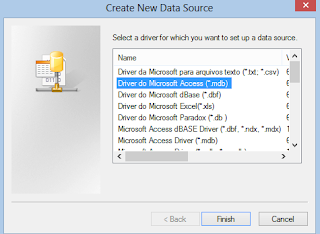
H ello Guys .This post is all about Connecting JSP to MS Access database -> JDBC ODBC Connectivity. Honestly speaking after struggling upon a lot on jdbc connectivity , finally at the end of the day , I brought to you the step by step process to CREATE  database and perform DDL and DML operations on that. So , Lets begin by creating a MS Access database. Go to Control Panel > Administrative Tools > ODBC DATABASE SOURCES. Now an ODBC Data   Source Administrator window will open. Click on Add button . Now Select Driver do Microsoft Access(*mdb) from the Create New Database Source window that appears like the image shown on right and click Finish Button.. Now create your Database source name . You can give any name you want. THIS NAME IS CALLED YOUR DNS ( Database Sourcse Name ). Click on "Create " button. NOW THIS STEP IS Worth IMPORTANT. PEOPLE USUALLY GIVES C:\ DRIVE  PATH ( the NTFS where windows is installed generally).. There's no pr...
Getting Started :: Developing Windows 8 apps in HTML , javascript

Hello my dear pals and friends... This is indeed a read must post for all the web developers and all those who are fond of HTML. MICROSOFT  has increased the horizon of apps development by allowing windows 8 apps to be developed in HTML language.. So Lets begin the journey -> developing windows 8 apps... So before getting started lets limelight the PRE-REQUISITES you need before starting developing Windows 8 apps. Y ou will need the following : 1) WINDOWS 8 OS : ya ! windows 8 apps can be developed only on machine                that runs Windows 8 because Windows 8 provides the preffered dot net framework required for windows 8 app development.  2) VISUAL STUDIO : Either you install Visual studio for windows 8 especially for trial version or else install Visual Studio 2012 premium or else. .....So these were the things needed.......Now lets develop windows 8 apps... ####################################...

How to make countdown timer in c#.net

Image
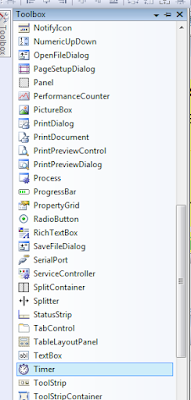
Hello friends, After a very very long time , lets grab some interesting stuff... ================================================== Today I'll show how to make a countdown timer in c#.net. ================================================== Step 1: first of all create a new project in c#.net (in visual studio)               FILE>NEW > PROJECT > c# PROJECTS Step 2 : Now we to set up a timer.                   We will make a downtimer here which'll count in decrement way.             Go to : Toolbars .             Under " All Windows Forms " select timer. Step 3 : Now a timer 1 will              appear at bottom of form. Step 4: Click on timer and go to properties pane            . set  Interval as 1000             This'll  ...

how to hack administrator using guest account in windows

Image
Hi friends , This topic is very much interesting .  This post explained how to hack admin account using guest account.  In colleges , schools etc. we know that admin account remains password protected and only guest account is open to use. Thus if we are using guest account then we can access admin account .                                         What is the basic concept behind this ? We all know that in windows pressing 5 times shift key opens sticky key dialog. This sticky keys dialog is also opened when we are at  login  page of windows. So the basic concept is that if  we  press shift keys 5 times and instead of sticky keys dialog , command prompt opens then we can run any command and thus admin is hacked.  But to make command prompt appear instead of sticky keys dialog we need guest account . This is called Backdoor .       ...

How to Install CCSM ( compizconfig settings manager ) in UBUNTU

Image
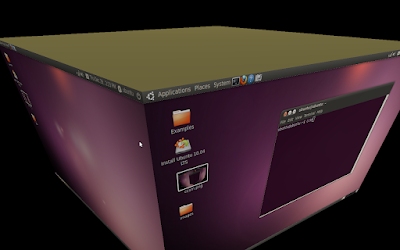
Hello and welcome friends. This post is devoted to Ubuntu Lovers. In this Post I will tell How to install CCSM  in Ubuntu.   CCSM basically is COMPIZCONFIG SETTINGS MANAGER which enhances GUI of workspace. Power  Of  CCSM You can Run Ubuntu from Pen Drive also without affecting main OS. To know how to install and run ubuntu from flash drive visit   How to install and Run Ubuntu from Pen Drive Now Lets come to point. STEP 1 : Open Terminal ( Accesories > Terminal  ) opening terminal STEP 2 : Write   sudo apt-get install compizconfig-settings-manager                 But sometimes a problem come that it tells enable ' universe ' component. CCSM Problem Enble Universe software sources STEP 3: So first of all We have to enable universe component. ( IF YOU HAVE ENABLED UNIVERSE COMPONENT ALREADY THEN SKIP THESE STEPS 3 AND 4)     >>   Go to SYSTEM > ENABLE ...